Water network analysis on GIS,
in one tool.
GISpipe brings EPANET water distribution analysis and SWMM storm and sewer analysis together on GIS. Validate and correct facility data, build models and run simulations in one place.
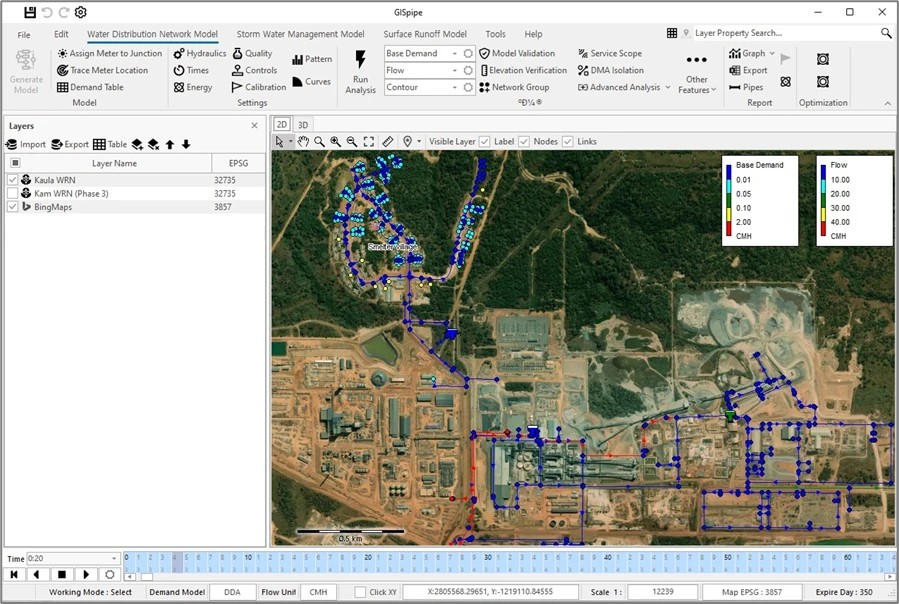
Features
From water supply to storm and flood,
everything network analysis needs
Load GIS facility data, fix its errors, build an analysis model and run the simulation.
Validation and correction
Finds connectivity errors in large GIS water facility datasets and corrects them automatically.
Automatic pipe correctionDistribution simulation
Analyzes pressure, flow, demand patterns, pumps and booster stations with the EPANET engine.
EPANETStorm and flood analysis
Combines SWMM with a 2D surface runoff model to analyze sewer networks and flood extent.
SWMM · 2D integrationTurbidity model
Simulates turbidity in the network to support water quality management and flushing plans.
Water qualityWhy GISpipe
From water to sewer, in one program
01
Water and sewer in one
From water distribution analysis (EPANET) to 1D and 2D storm and sewer analysis (SWMM), all in one program.
02
No other software needed
No ArcGIS, no AutoCAD. Install GISpipe and go from model building to 2D and 3D results and reports.
03
Standard engines
Built on the world-standard EPANET 2.2 and SWMM 5.2 engines, so existing model files and results stay compatible.
04
Proven in Korea
Used by local governments and more than 130 engineering firms in Korea.
05
1/20 the cost of comparable software
Every water and sewer feature, with no limit on the number of pipes, at 1/20 the cost of comparable commercial software.
* Based on published one-year, single-user subscription prices for major commercial network modeling software with unlimited pipes, as of October 2026. Prices vary with exchange rates.
At a glance
How is GISpipe different from overseas commercial software?
| Item | Overseas commercial software | GISpipe |
|---|---|---|
| Water and sewer | Water and sewer sold as separate products | Water plus 1D and 2D storm and sewer analysis in one program |
| Working environment | Often used together with separate GIS or CAD software | Built-in GIS, no other software needed |
| Comparing alternatives | Set up through scenario management (tree structure) | Copy network layers and overlay them to compare at a glance |
| Elevation input | Extracted from DEMs you already have | Builds a DEM from contours automatically, or downloads satellite terrain data when you have none |
| Pipe count | Limited by license tier | Unlimited |
| Cost | Annual subscription per tier and product | About 1/20 of overseas commercial software |
* Compared with published information on major overseas commercial network modeling software, as of October 2026.
GISpipe key features
| Engines | EPANET 2.2 for water, SWMM 5.2 for storm and sewer (1D and 2D) |
|---|---|
| Water quality | Concentration, water age, source tracing, turbidity |
| Operations | Fire flow, flushing, pump scheduling, energy analysis |
| Service areas | Service area analysis for each reservoir and tank |
| Data checks | Model validation, automatic detection of disconnected networks and duplicate pipes, elevation check against DEM |
| Editing | Editing on satellite maps, undo and redo |
| Results | Color-coded maps, graphs, 2D and 3D views, reports |
Download
Installer and manuals
Download the installer, sample data and user manuals.
Learn
Follow the examples
and get started
Download the installer, sample data and manuals, then learn GISpipe step by step with the tutorials.
Request a quote or technical support
Send a quote request and your quotation will be emailed to you right away. For questions about using GISpipe, send a technical support request and our team will get back to you.